Is AI Automation Worth It for a Small Business? Costs and ROI

You keep hearing that AI automation pays for itself, and you also keep seeing subscription prices that say otherwise. Both claims can be true at the same time, and the difference is your workflow, not the software. This guide gives you the real entry costs of the three most popular automation platforms, verified on their pricing pages today. It also gives you a simple break-even formula you can run on a napkin. By the end you will know whether AI automation is worth it for your business size. You will also know which free tier to start with, and how to test the idea in 30 days without committing to anything.
What AI automation actually means for a small business
Automation for a small business rarely looks like a robot. In practice, it is a chain of small rules. When a customer fills in a form, add the row to a spreadsheet. When an invoice is paid, send a thank-you email. When a new order lands, notify the team chat. Platforms like Zapier, Make and n8n connect your apps so these chains run without you touching them.
For most small businesses, the candidate tasks are easy to spot once you look for them. Quotes and invoices get copied between email and a spreadsheet. New leads from a contact form get retyped into a CRM. Social posts get cross-posted by hand. Appointment confirmations and review requests get sent one by one. Each task takes only a few minutes, which is exactly why nobody counts them. Yet together they quietly eat a full working day every week or two.
The AI part is a newer layer on top of that plumbing. A step can now do more than move data. It can read an email and decide if it is a complaint, draft a reply, or summarize a meeting transcript into tasks. If you want the deeper definition, our explainer on what an AI agent is covers how these decision-making steps differ from plain automation. The key point for budgeting is simple: the AI step is just one more metered unit in the same bill.
Because of that, the worth-it question splits into two smaller questions. First, do you have repetitive work that follows rules a computer can check? Second, does the time you reclaim cost more than the subscription? Everything below helps you answer those two with numbers instead of vibes.
What it costs right now, verified on the pricing pages
Prices change often in this market, so here is what the three biggest platforms actually charge today. Everything below comes from their live pricing pages this morning. All three have a real free tier, which matters more than any feature list when you are testing.
Verified entry prices today
| Platform | Free tier | Entry paid plan | Billing unit |
|---|---|---|---|
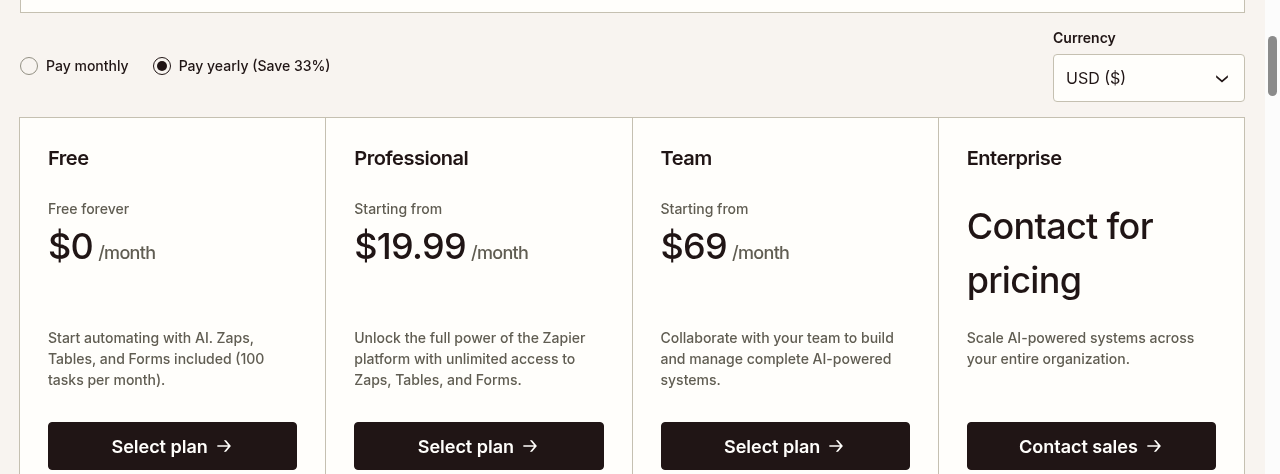
| Zapier | Free forever, 100 tasks per month, unlimited Zaps, Tables and Forms, two-step Zaps | Professional from $19.99 per month billed yearly, with multi-step Zaps and unlimited premium apps | Tasks |
| Make | 1,000 credits per month on the Free plan | Paid tiers scale by credits; most actions consume 1 credit since the August 27 billing change | Credits |
| n8n | Self-hosted Community Edition | Cloud Starter from $20 per month billed yearly, 2.5k workflow executions; Pro $50; Business $800 | Executions |
Here is Zapier’s pricing page as captured today, showing the Free and Professional tiers side by side:
What the sticker price hides
A few pricing details are worth reading closely on those pages. Zapier’s yearly billing saves 33% compared with paying monthly. n8n’s annual billing saves 17%, and its Starter plan allows unlimited steps per run. That is why multi-step chains are cheap there. Make’s FAQ confirms that most actions consume a single credit, so 1,000 free credits cover roughly 1,000 actions per month.
Two things deserve attention before you compare the sticker prices. To start, the billing units differ, so $19.99 at Zapier and $20 at n8n do not buy the same thing. On top of that, all three free tiers are genuinely usable for a pilot, so your first real cost is time, not money.
If you want a wider scan of zero-cost options, our roundup of free AI automation tools maps every free tier we could verify. The Zapier vs Make vs n8n comparison then goes feature by feature. For the broader strategy picture, the AI automation guide walks through the whole decision from first workflow to team rollout.
The simple ROI math, without the hype
Vendor case studies love percentages in the hundreds. You do not need them, because the honest math fits in three lines. Write down how many hours per month a task takes you or your team. Multiply by what an hour of that time costs you. Then compare the result to the subscription plus the setup hours.
A worked example, with invented numbers
Take a concrete example. Say Lina runs a four-person online shop, and this is an invented illustration, not a real customer. She spends about six hours a week copying order details into a spreadsheet and sending tracking replies, roughly 26 hours a month. Valued at $15 an hour, that is $390 a month in attention. A $19.99 Professional plan that automates the chain saves her around $370 a month after the subscription. Her two setup evenings pay back inside the first week.
When the math says no
Run the same math on a thinner task and the answer flips. Imagine a monthly newsletter that takes 40 minutes to assemble by hand. Even at $25 an hour, that is about $17 of time per month, so any paid plan would lose money on that task alone. The same platform can be a bargain for one workflow and a waste for another. That is why the question is never whether the tool is worth it. It is whether your specific task is.
Notice what the formula forces you to admit. If the task takes 20 minutes a month, no subscription beats doing it by hand. On the other hand, consider tasks where mistakes cost money, like missed invoices or wrong addresses. There the error reduction often outweighs the time saving entirely. Run the formula on your own task before you read another feature page.
When it is worth it, and when it is not
Automation pays fastest on work that is frequent, rule-based and boring. Daily or weekly repetition gives you volume, and clear rules give you reliability. Boring work is also exactly where humans make copy-paste mistakes. A new-lead notification, an invoice reminder or a stock-level alert all qualify.
It pays slowest on work that needs judgment, taste or a relationship. A welcome email can be automated. A delicate refund negotiation should not be, because one wrong automated reply costs more goodwill than a month of saved minutes. Similarly, a task you do once a quarter rarely justifies a standing subscription, even a cheap one.
A quick filter helps you sort your own task list. A task qualifies when it happens at least weekly, follows steps you could write down for a new hire, uses data that already lives in apps with integrations, and fails harmlessly while you test it. Tasks that fail any of those four tests stay manual for now, and that is fine, because one good automated chain beats five fragile ones.
There is also a middle case worth naming: tasks that are frequent but messy, like triaging a shared inbox. This is where the AI layer earns its fee, since classification and drafting handle messiness that pure rules cannot. If that is your situation, our guide to building your first AI automation workflow shows a safe starter pattern that keeps a human approval step in the loop.
The hidden costs most ROI pitches skip
The subscription is the visible cost, but three quieter ones decide the real return. First is setup time. A workflow that takes four evenings to build needs months of runs to repay them, so start with the smallest useful chain. Second is maintenance, because apps change their APIs, passwords expire and edge cases appear, so expect a small repair session every month or two.
There is a fourth cost that rarely appears in ROI pitches: access. Every connected app grants the platform permission to read or write your data, so a growing automation stack quietly becomes a security surface. Use a dedicated password manager entry for each connection, prefer the minimum permissions each integration offers, and review connected apps quarterly. None of this is hard, but skipping it turns a time-saving tool into an account risk.
Third is metering surprise. A Zapier task, a Make credit and an n8n execution sound interchangeable until a loop in your workflow burns through a month of allowance in a weekend. Every platform offers usage alerts, so turn them on during week one. In addition, keep your workflows single-purpose at the start. One tangled mega-workflow is harder to debug than three small ones.
None of these costs kills the business case for a well-chosen task. They just belong on the napkin next to the subscription price, so your break-even number is honest.
A 30-day pilot that gives you a real answer
Instead of debating whether automation is worth it in the abstract, run one bounded experiment. Pick a single task that follows the frequent, rule-based, boring pattern. Then sign up for a free tier and build the smallest version of the chain, which our AI automation for beginners walkthrough covers step by step if you want a companion.
For the first two weeks, let the workflow run but check every output by hand, and log two numbers each day: minutes the workflow saved you, and minutes you spent fixing it. After that, run the third week without the hand-checking and see if the saved minutes hold up. At the end of the month, plug your logged hours into the formula above, and the decision makes itself.
One habit makes the pilot far more reliable: decide the success threshold before you start. Write down something like, if this saves me under two hours a month, I delete it and move on. Without that line in advance, sunk-cost thinking will talk you into keeping a workflow that only exists because you built it. A written threshold turns the experiment into a real decision instead of a slow drift into another subscription.
If the pilot saves you less than the paid tier costs, you have lost nothing but a few evenings, and you have learned exactly where automation does not fit your business. If it saves you more, you upgrade with evidence instead of hope. Either way, you answered the question with your own numbers, which is the only answer that counts.
Quick answers
Is AI automation worth it for a very small business or a solo freelancer?
Yes, if you have at least one repetitive task that takes an hour or more each week. Free tiers from Zapier, Make and n8n cost nothing, so a solo operator’s break-even point is simply the time spent building the workflow. Start there before paying for anything.
How much does AI automation cost per month for a small business?
Entry paid plans start around $19.99 to $20 per month on yearly billing at Zapier and n8n, verified on their pricing pages today. Many businesses never leave the free tiers for their first few workflows. Budget for the subscription plus a few hours of setup and monthly maintenance.
Which is cheaper, Zapier, Make or n8n?
It depends on your volume, because each one meters differently. Zapier charges per task, Make per credit and n8n per whole workflow run, so a five-step workflow costs five units at Zapier, roughly five credits at Make, and one execution at n8n. Heavy multi-step workflows are usually cheapest on n8n, while occasional simple ones fit Zapier’s free tier.
How long until automation pays for itself?
For a task that runs daily, most small workflows repay their setup time within the first month, since the subscription is under $25. Monthly or rare tasks can take much longer or never break even, which is why the pilot approach above matters more than any average.
Do I need technical skills to set up AI automation?
No coding is needed for Zapier or Make, since both use visual builders with templates. n8n has a steeper learning curve but rewards it with more generous pricing at volume. In all three cases, the harder skill is clearly describing your own process step by step.
Sources
- Zapier pricing – Free and Professional tier details and prices, verified today; screenshot above captured from this page.
- Make pricing – Free plan of 1,000 credits per month and the August 27 change to credits as the billing unit, verified today in the page FAQ.
- n8n pricing – Cloud Starter, Pro and Business prices and execution limits, plus the self-hosted option, verified today.